Cut + paste inside a contenteditable list item nests a list inside it
What happens
With <ul><li contenteditable>abc</li></ul>,
selecting everything in the item and cutting copies the item's ancestor
list context, so the clipboard holds
<ul><li>abc</li></ul>. Pasting that
back into the now empty item puts a whole list inside it:
<li><ul><li>abc</li></ul></li>.
The destination item is the editable root, so
ReplaceSelectionCommand cannot put the pasted item next to it
in the parent list -- that list is outside the editable region -- and falls
back to nesting. Reported in 2014.
The CL unwraps a pasted single-item list and merges its content into the
empty destination, behind the default-on
EditingPasteListIntoRootListItem kill switch.
Select all, ctrl+x, ctrl+v inside the editable list item
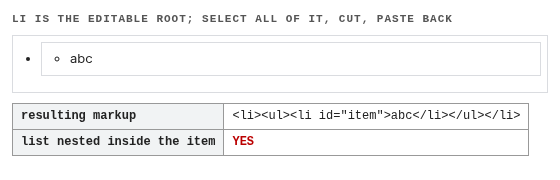
<ul><li>abc</li></ul>, visible as a
second, indented bullet.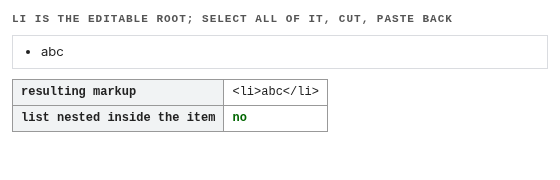
abc and the list structure is unchanged.
execCommand('paste') -- so the capture sends real
keystrokes.How narrow the carve-out is
The merge only fires when the destination is an empty list item whose
parent is not editable, and the pasted fragment is a list with
exactly one item. The test file pins all three boundaries: the root-item
case that is being fixed, the same cut + paste inside
<div contenteditable> (which already worked and still
takes the existing path), and pasting a two-item list into the root item,
which still nests because those items have nowhere else to go.
Verification
editing/pasteboard/cut-paste-entire-li-content.htmlfails with--disable-blink-features=EditingPasteListIntoRootListItemwith<li><ul><li>abc</li></ul></li>and passes with it.- The whole
editingsuite: 2647 tests as expected. - 131
*ReplaceSelection*/*Editing*unit tests pass.