Checkboxes of the same size paint one pixel apart depending on where they sit
What happens
Theme parts are painted into
ToPixelSnappedRect(paint_rect), which snaps both edges: the
width it produces is
round(offset + size) - round(offset), so a fractional size
gives a different pixel size depending on the sub-pixel offset. For a
13.4px checkbox at offset .0 that is 13px, at offset .4 it is 14px.
Resizing a window makes a row of identically sized checkboxes grow and
shrink out of step, which is what the 2016 report describes.
The CL rounds the size of checkbox and radio parts on its own, in
rendering coordinates
(gfx::ToRoundedPoint + gfx::ToRoundedSize), so the
painted size depends only on the layout size. Whole-pixel controls, i.e.
nearly everything, are untouched, and all other theme parts keep snapping
both edges so they stay flush with adjacent boxes. Behind the default-on
ConsistentFormControlPaintSnapping kill switch.
10 checkboxes, 13.4px each, every second one 0.4px off the grid
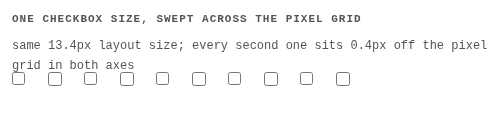
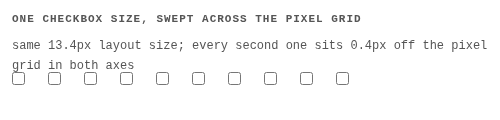

| build | painted squares, left to right |
|---|---|
| before | 13, 14, 13, 14, 13, 14, ... |
| after | 13, 13, 13, 13, 13, 13, ... |
Verification
- Five
ThemePainterTestcases: size stability for checkbox and radio, whole-pixel controls unchanged, other parts still edge-snapped, and the kill switch restoring the old behavior. fast/forms+paint: 2985 tests; the four*-appearance-basicpixel tests change, which is the fix itself -- only the zoomed, fractional-size checkboxes in them differ, and they need rebaselining.- Both theme paint call sites use the new snapping, so the behavior does not depend on which painter a control goes through.