corner-shape: bevel; child image covers the border
content_shell screenshot (ToT, software raster)
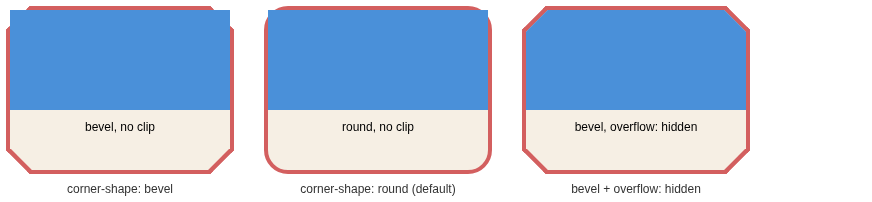
Explanation
All three cards use border-radius: 24px; border: 4px solid;
and contain a square-cornered image.
Left (corner-shape: bevel, no clip): the
image's square corners paint over the bevel border diagonals and overhang
the card outline. This is the reported "hidden top borders".
Middle (default round corners, no clip): the exact same overlap happens, just shallower -- the long-standing behavior of every browser since border-radius shipped.
Right (bevel + overflow: hidden): the image
is clipped to the beveled shape.
Per css-backgrounds-3 §5.3, the corner curve clips only the
element's own background and border -- descendants are clipped only when
overflow is not visible. A pixel diff confirms the
border paints identically with and without the clip. Not a Blink bug;
author fix is overflow: hidden or clip.