Time picker gap under zoom
The bug
With browser zoom at 90% (or 110%), the native time / datetime-local picker
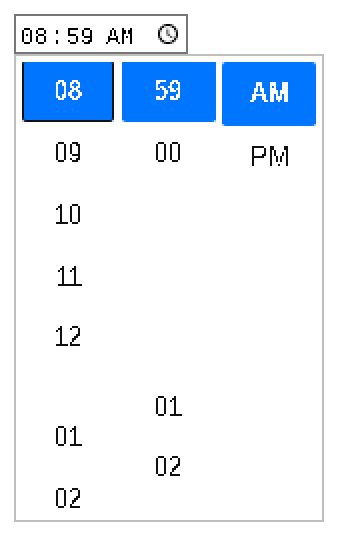
shows a gap in its scrolling columns, right where a column wraps around:
between 00 and 01 in the minutes column, and between
12 and 01 in the hours column.
Try it
Live repro
1. Set browser zoom to 90% (Ctrl/Cmd + Minus once).
2. Open a picker below (click the clock/calendar icon).
3. Scroll the minutes column towards 59 / 00.
At 100% zoom the columns are seamless.
Before / after
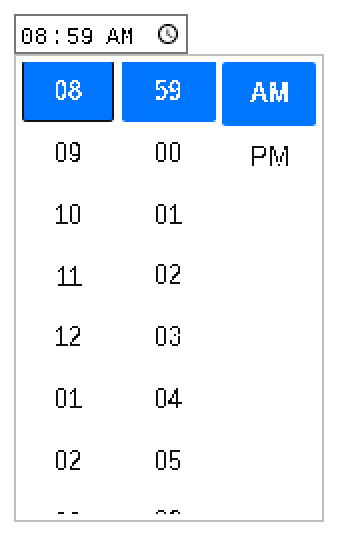
Captured with content_shell at 90% zoom, <input type=time value="08:59">.
Before gap after "00" and "12"
After columns stay contiguous
Root cause
The looping columns in time_picker.js scroll by rotating cells
with style.top, using a hardcoded cell height of 36px. Under page
zoom the real layout spacing of a cell differs slightly (zoomed lengths are
rounded during layout), so the accumulated per-cell error surfaces as a gap at
the column wrap point. The fix measures the real cell positions from layout
before any cell is repositioned and uses those for the rotation math.